🔢 Data Point Types Explained (INT, BOOL, STR, JSON, RAW + enum fields)
-
Data Point Types Explained
A data point type is not just a storage detail. It decides what the dashboard can render, what a control widget can write, and how the value is validated.
This guide covers the types exposed by the current create panel, plus the two cases people ask about most: decimals and enum values.

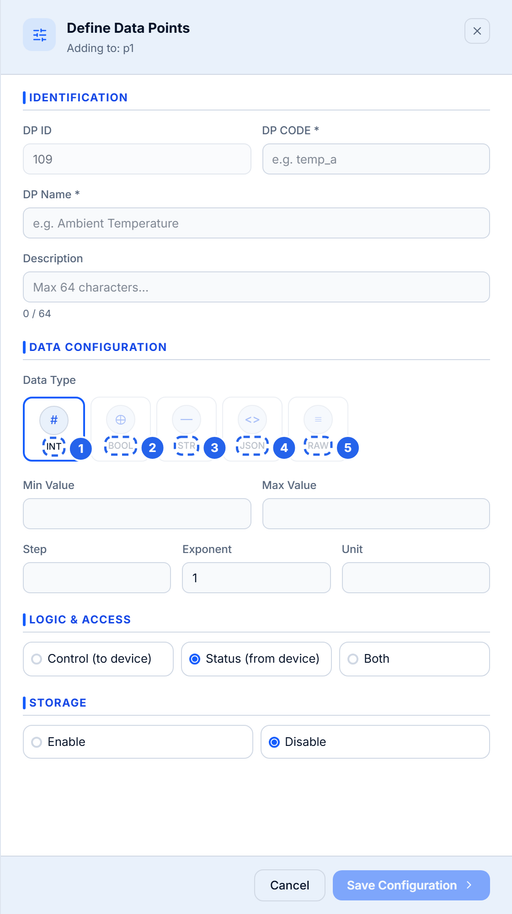
The create panel exposes INT, BOOL, STR, JSON and RAW. INT is the numeric type and accepts decimal values.
The five top-level types
Button Stored as Use it for Notes INT JSON number Temperature, humidity, voltage, counters The numeric type. Decimals are allowed even though the label says INT. BOOL Boolean Pump on/off, door open/closed, relay state Send real true/false, not"on"or1.STR String Mode names, firmware version, short labels Set a max length. JSON Object with typed fields Schedules, config blobs, grouped telemetry Defined as named fields with their own types. RAW String Opaque vendor frames, hex payloads, pre-encoded data Stored as text; the platform does not interpret it. INT is the numeric type
The create panel labels the numeric type INT, but the backend stores it as a number. That means
25.4is a valid value.There is no separate FLOAT button in this build. If you need fractional values, use INT and set the unit, min, max, and step. When the widget prompts for a number, the step controls the increment.
BOOL is strict
A boolean data point expects
trueorfalsein the payload:{ "pump": true }Sending
"true",1, or"on"may be accepted as a string by JSON but will not behave like a boolean in widgets and automations. Normalise the value in firmware before publishing.STR and RAW are not the same
Both are stored as strings, but they signal different intent:
- STR is human-readable:
"auto","eco","v1.4.2". Use it when the dashboard may display or select the value. - RAW is opaque: a hex frame, a base64 blob, a vendor-specific payload. Use it when the platform should store and forward the value without interpreting it.
If you want to display the value, prefer STR. If you want to preserve bytes, prefer RAW.
JSON data points
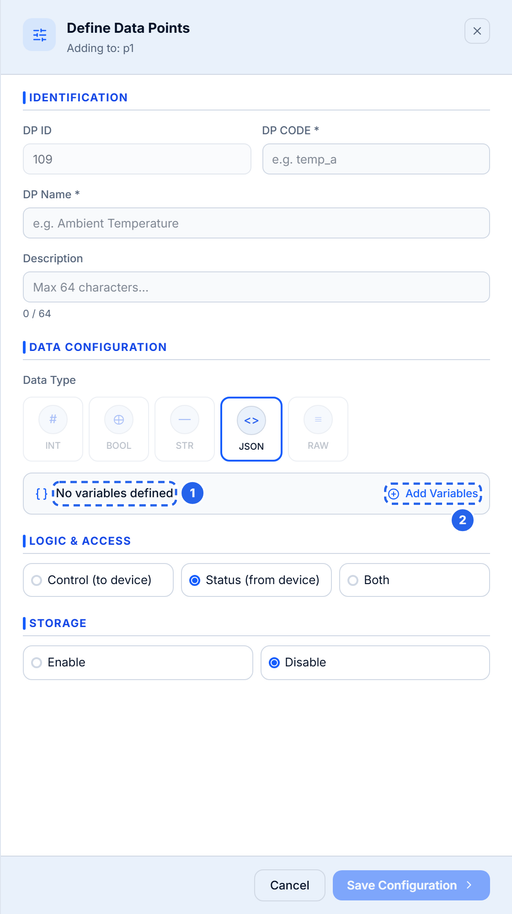
A JSON point is a small schema. Instead of one value, it contains named fields, each with its own type:

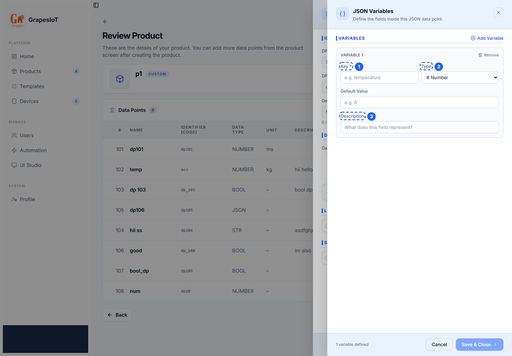
JSON data points are defined as a set of named fields. Each field has its own type and optional default.
{
  "schedule": {
    "start": "06:00",
    "duration_min": 15,
    "enabled": true,
    "mode": "auto"
  }
}
The JSON field editor lets you define each field's key, type, default value, and description. Supported field types are:
- bool
- number
- string
- enum
Use JSON when the values belong together and you want one data point instead of five. Use separate top-level points when each value needs its own widget, history, or automation trigger.

Inside a JSON point you can mix bool, number, string and enum fields. The key is what your device publishes.
Enum fields
Enum is available as a field type inside JSON and as a binding type in widgets. It maps a stored value to a human label:
Key Label autoAutomatic ecoEco manualManual This is the right choice for mode selectors and state machines. A top-level ENUM type is reserved in the schema and supported by some widgets, but the current create panel does not expose it as a top-level button. If you need named states today, use a JSON field with type Enum, or a STR with a documented set of values.
Direction is part of the type decision
The type says what the value is. The direction says who owns it.

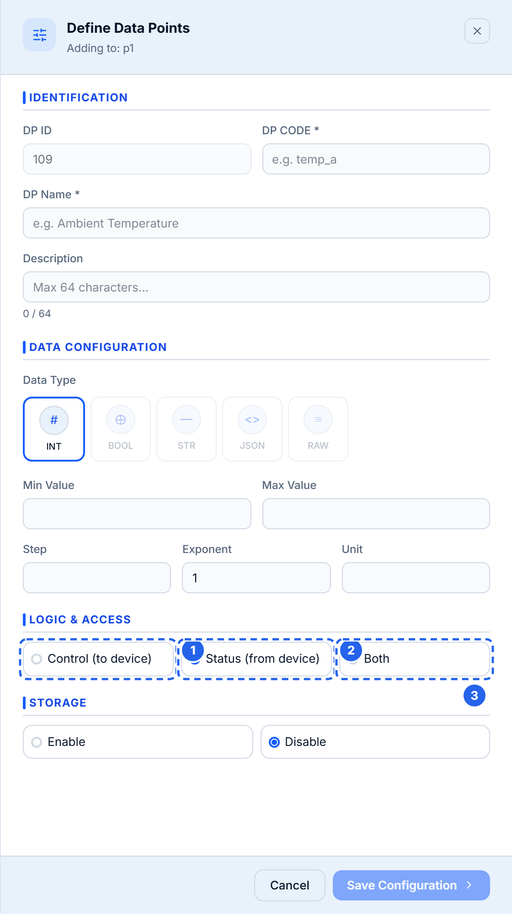
Direction decides who owns the value: Control means the dashboard writes it, Status means the device reports it.
Direction Meaning Typical examples Status (from device) Device reports; dashboard reads Temperature, humidity, battery Control (to device) Dashboard or automation writes; device obeys Pump, target temperature, mode Both Device reports and dashboard can write Setpoint echoed by the device Choose direction before you deploy. A control widget cannot bind to a status-only point, and changing direction later can invalidate existing bindings.
Storage and history
Storage is separate from type. A point can be live-only or stored:
- Live-only: the current value is available to monitors and widgets, but no history is kept.
- Stored: history is written for charts, exports, and audits.
High-rate telemetry is often live-only. Daily totals, alarm states, and setpoints are usually stored.
Naming rules
The identifier is the key your device publishes, so keep it stable and boring.
- Must start with a letter.
- Lowercase letters, numbers, and underscores only.
- Maximum 16 characters.
- Must be unique within the product.
- Name: maximum 32 characters.
- Description: maximum 64 characters.
Good:
temp,humidity,pump_state,battery_v.
Avoid:Temp,pump-state,temperature_sensor_1,t.Choosing a type: quick guide
If you are measuring... Use A number, including decimals INT An on/off state BOOL A short label or mode name STR A group of related values JSON An opaque frame or blob RAW A named state inside a group JSON field with type Enum Common mistakes
- Sending a string for a numeric point.
"25.4"is not25.4. Cast in firmware. - Using BOOL for a multi-state value. A pump is boolean; a mode with three values is not.
- Using five top-level points for one config blob. Use JSON when the values are always updated together.
- Using JSON when each value needs history. History and widgets are easier with separate points.
- Renaming a code after devices are deployed. Add a new point instead.
Next
- Quickstart: Device → MQTT → Live Monitor for a working publisher.
- Your First Dashboard in UI Studio for binding each type to the right widget.
- STR is human-readable:
Hello! It looks like you're interested in this conversation, but you don't have an account yet.
Getting fed up of having to scroll through the same posts each visit? When you register for an account, you'll always come back to exactly where you were before, and choose to be notified of new replies (either via email, or push notification). You'll also be able to save bookmarks and upvote posts to show your appreciation to other community members.
With your input, this post could be even better 💗
Register Login