🧠 How GrapesIoT Models Your Fleet: Products → Data Points → Devices
-
How GrapesIoT Models Your Fleet
Most first-week confusion comes from one question: what is the difference between a product, a data point, and a device?
They are three layers of the same contract.
Product  →  what kind of thing am I?
Data point →  what values does it expose?
Device  →  which physical unit is talking right now?
Get those three right and everything else — MQTT, dashboards, history, automation — follows naturally.

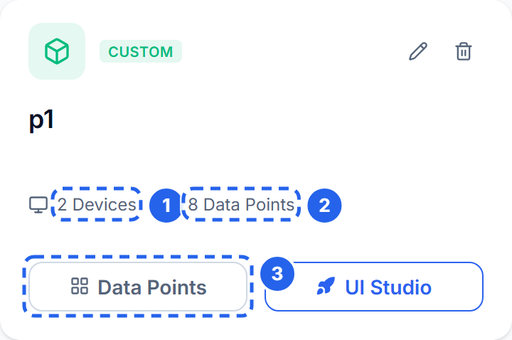
A product is the template. The card summarises how many devices use it and how many data points it defines.
Product: the schema, not the hardware
A product is a template for a class of device. It is not a physical unit and it does not connect to the broker by itself.
A product holds:
- a name, description, and icon,
- the list of data points that every device of this type must expose,
- product-level metadata used by the UI and by templates.
Think of it as the firmware interface description. If you are building a greenhouse controller, the product might be
Greenhouse Controller v1. Every greenhouse controller you ship uses that same product, so every dashboard, alert, and history query works the same way.Create one product per hardware family. Do not create a product per unit. If two units differ only by serial number, they are devices of the same product.
Data point: one named value in the contract
A data point is one value the product exposes. It has:
Field Purpose Example Name Human label Ambient Temperature Identifier (code) Machine key used in payloads tempData type How the value is interpreted INT / BOOL / STR / JSON / RAW Direction Who writes the value Status / Control / Both Unit Display suffix °C Min / max / step Validation and widget bounds 0 / 60 / 0.1 Storage Whether history is retained on / off Two rules matter more than the rest:
- The identifier (
dpcode) is the key your device publishes. It is not the numeric data point ID. - The data type and direction are part of the contract. A dashboard widget that needs a boolean will not bind to a string point, and a control widget will not write to a status-only point.
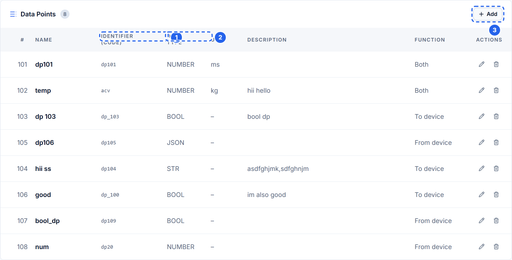
The product detail page lists every data point and shows the code, type, unit, and direction in one table.

Data points define what a device can report or accept. The identifier becomes the key you publish in MQTT.
Direction: status, control, or both
- Status (from device): the device reports it. Temperature, humidity, battery voltage, fault code.
- Control (to device): the dashboard or an automation writes it. Pump on/off, target temperature, mode selector.
- Both: the value can be reported and written. Use this for things like a setpoint that the device also echoes back.
Direction is enforced by the UI and by the binding rules. If a widget cannot see a data point, check the direction before you check the network.
Storage: live vs history
A data point is live by default. Enable Storage when you need history for charts, exports, or audits. Storage is a per-data-point decision, so you can keep high-rate telemetry live-only and still retain daily totals.
Device: one physical unit
A device is one unit of a product. It has:
- a device UUID (used in the MQTT topic),
- a client ID / MQTT username and password,
- an optional owner assignment,
- a live connection state,
- a monitor view that renders the product's dashboard with real values.
When you create a device, assign it to the product. The device then inherits the product's data point schema. If you add a data point later, every device of that product sees it; no per-device schema migration is needed.

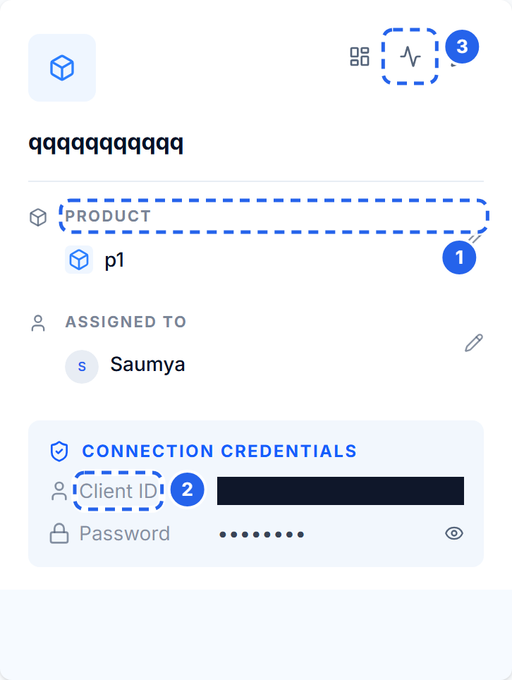
A device is one physical unit. It inherits the product schema and gets its own MQTT client ID and password.
Device ID vs client ID
They are related but used in different places:
- The device UUID identifies the device in the topic:
1v0/<DEVICE_ID>/uplink. - The client ID shown on the device card is the MQTT username. In the standard provisioning flow it is the same UUID.
- The password is generated with the device. It is a secret.
If your account shows a client ID that differs from the device UUID, use the client ID as the MQTT username and the device UUID in the topic.
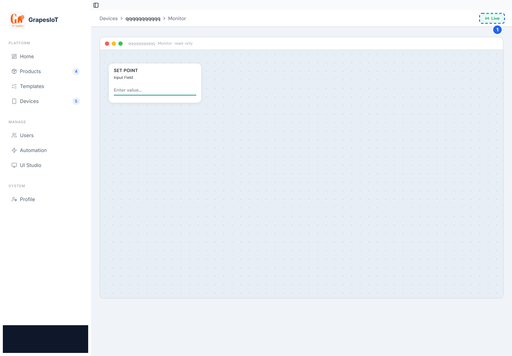
The monitor is where the model becomes visible: the device's live state is rendered through the product's dashboard, using the bindings defined in UI Studio.

The monitor is the runtime view: live values arrive over WebSocket as soon as the device publishes.
A worked example
Product: Greenhouse Controller v1
Code Name Type Direction Unit Storage tempAmbient Temperature INT Status °C on humidityRelative Humidity INT Status % on pumpPump State BOOL Both — off modeOperating Mode STR Both — off scheduleSchedule JSON Both — off A device of this product publishes:
{
  "type": 0,
  "stype": 0,
  "data": {
    "temp": 25.4,
    "humidity": 60,
    "pump": true
  },
  "dir": 49
}
The keys
temp,humidity, andpumpare the data point codes, not their numeric IDs. The server matches them to the product schema and updates the device's live state.The five mistakes to avoid
- Putting
dpidin the payload. The payload usesdpcode. Numeric IDs are internal. - Creating a product per unit. Create a product per hardware family, then add devices.
- Renaming a
dpcodeafter deployment. It is a breaking change for every device and dashboard. Add a new point and migrate instead. - Using a status-only point as a control. The widget will not bind, or the write will be rejected.
- Storing everything. High-rate telemetry can be live-only. Enable storage only where history is useful.
What to read next
- Quickstart: Device → MQTT → Live Monitor for the exact topic, payload, credentials, and a runnable publisher.
- Data Point Types Explained for choosing the right type.
- Your First Dashboard in UI Studio for binding widgets to the data points you just defined.
Hello! It looks like you're interested in this conversation, but you don't have an account yet.
Getting fed up of having to scroll through the same posts each visit? When you register for an account, you'll always come back to exactly where you were before, and choose to be notified of new replies (either via email, or push notification). You'll also be able to save bookmarks and upvote posts to show your appreciation to other community members.
With your input, this post could be even better 💗
Register Login